Answers about the local AI image generator on your iPhone, iPad, and Mac.
Which devices run which models, what you can set besides the prompt, where your pictures are kept, including your own iCloud, and what the app sends to us, which is nothing. Where the answer is no, or not yet, it says so.
Getting Started
You need iOS, iPadOS, or macOS 26.4 or later on Apple Silicon, and memory decides which models a device runs. Every iPhone 15 Pro or later runs the 8 GB models, and the iPhone 17 Pro, 17 Pro Max, 18 Pro, 18 Pro Max, iPhone Air, and iPhone Duo have the 12 GB that opens more of them. On iPad you need an M-series chip, and the iPad Pro with 1 TB or 2 TB of storage has the 16 GB that runs every model. Any Apple Silicon Mac works, and a Mac with 16 GB runs every model. Intel Macs are not supported.
It works offline, and you never need an account. Each model downloads once, and from then on Private Diffusion is an offline AI image generator: it turns your prompt into a finished image right on your iPhone, iPad, or Mac.
Private Diffusion includes Anima, Flux.2 Klein 4B, Nanosaur 2, Mage Flow Turbo, MOSS-Image, Krea 2 Turbo, Kroma Turbo, Z-Image-Turbo, Juggernaut Z Fast, ERNIE Image Turbo, Chroma1-Flash, and Boogu Image Turbo. Each one downloads inside the app and runs on your device. You cannot add a custom model, load a LoRA, or import a model file, so every model you see is one the app ships. The Models page shows what each one is good at and which devices run it.
Memory decides. Anima, Flux.2 Klein 4B, and Nanosaur 2 run on 8 GB, so every supported iPhone runs them. Z-Image-Turbo, Juggernaut Z Fast, Mage Flow Turbo, and MOSS-Image need a 12 GB iPhone. Z-Image-Turbo and Juggernaut Z Fast also run on an 8 GB iPad and on any Mac, while Mage Flow Turbo and MOSS-Image need a 12 GB iPad or a Mac with 16 GB. Krea 2 Turbo, Kroma Turbo, ERNIE Image Turbo, Chroma1-Flash, and Boogu Image Turbo need 16 GB, which no iPhone has, so they run on an iPad or Mac.
Between about 1.1 GB (Nanosaur 2) and 13 GB (Boogu Image Turbo) per model. Models that share a text encoder cost less together: with Flux.2 Klein 4B installed, Z-Image-Turbo adds about 4 GB instead of 6.4, and with Krea 2 Turbo installed, Kroma Turbo adds about 7.9 GB instead of 12. Nanosaur 2 prepares each image size on your device the first time you use it, which can take a few minutes and happens again after each app update. It can use up to 3 GB on iPhone or 4 GB on iPad or Mac as sizes are prepared. Models download from Private Diffusion's own server, pick up where they stopped after an interruption, and send a notification when they finish. On iPhone and iPad a download keeps going with the app closed. On a Mac, quitting the app stops it, and it resumes at the next launch. You can delete any model to free the space and download it again later.
You pick one of seven aspect ratios and a size from S to XL, or S to L on Nanosaur 2, with the larger sizes depending on your device's memory. Each Generate picks a new random seed, and turning off Randomize lets you use a seed you type. Negative prompts work on Flux.2 Klein 4B, Z-Image-Turbo, Juggernaut Z Fast, Chroma1-Flash, and Kroma Turbo, and on MOSS-Image in its Quality mode on a Mac. Rewrite Prompt, the on-device enhancer, works on Flux.2 Klein 4B, Z-Image-Turbo, ERNIE Image Turbo, Juggernaut Z Fast, Krea 2 Turbo, and Kroma Turbo. Anima and Kroma Turbo add a steps slider. On an iPad or Mac with 18 GB or more, Krea 2 Turbo adds a Krea 2 adapter you set to Off, 4-step, or 2-step, and Kroma Turbo adds one you set to Off or 4-step. On a Mac, MOSS-Image adds a choice of 4-step or Quality, which runs 50 steps and takes much longer; on iPhone and iPad it runs 4-step only. Every model but Nanosaur 2 offers the upscaler at 2x and a live preview that shows the image as it forms. Max quality turns off denoise acceleration for a slower run; it has no effect on Nanosaur 2 or MOSS-Image.
No. Private Diffusion turns text into images, and every picture starts from a prompt. There is no image-to-image, inpainting, or reference image input. To build on a picture you already made, open it with Recreate in Studio and change the prompt or the seed.
Private Diffusion is what you open when you want the picture, not the pipeline. Four differences:
- It uses the GPU and the Neural Engine together. For every model but Nanosaur 2, the diffusion model runs on the GPU through MLX, and all of them but Mage Flow Turbo and MOSS-Image use the Neural Accelerators built into M5, M6, A19 Pro, and A20 Pro GPUs. On the Mac, every one of them, MOSS-Image included, requests the Neural Engine for the live preview, the final decode, and the upscaler. Nanosaur 2 runs entirely on Core ML, across the Neural Engine and the GPU.
- Every model is quantization aware distilled (QAD). We train the weights after we shrink them, against the full-size original, until the small one answers the same way.
- Private Diffusion collects no user data. Draw Things collects Purchases, User Content, and Identifiers, as its creators admit in the app's App Store privacy nutrition labels.
- It is a native Swift app that follows Apple's Human Interface Guidelines to the T. On the Mac that means a macOS 26 app with Liquid Glass, menu bar commands, and keyboard shortcuts.
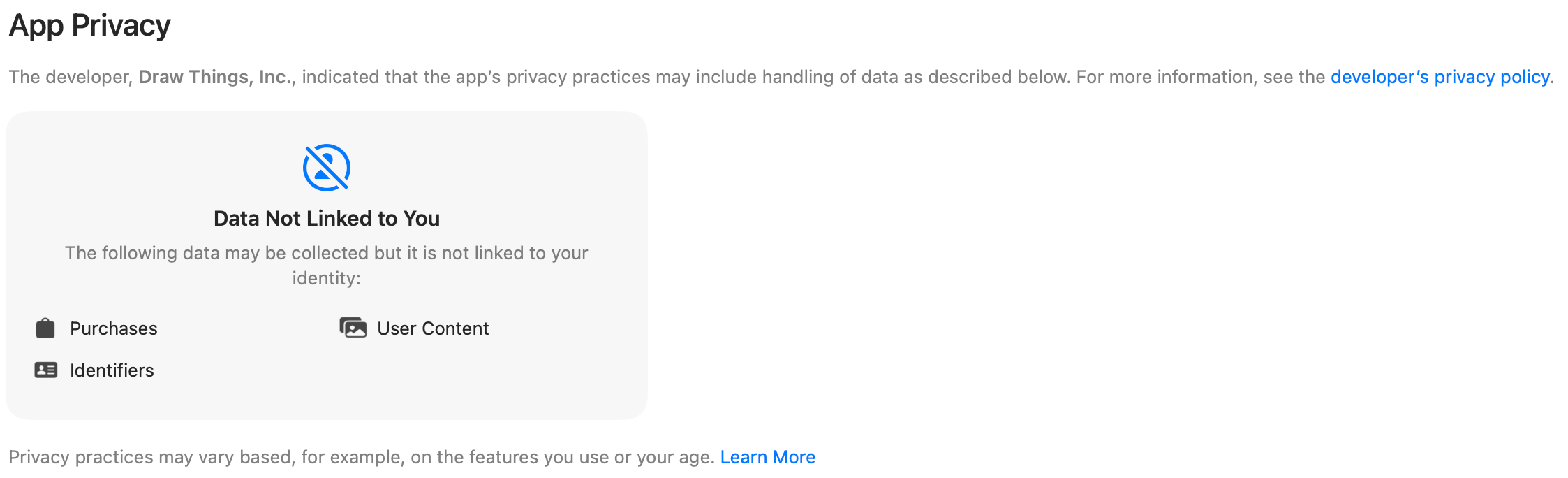
Draw Things' own App Store privacy nutrition label, as of 30 August 2026. Private Diffusion collects no user data. ComfyUI Desktop turns on PostHog usage telemetry and Datadog error reporting by default at first launch. Private Diffusion is a sandboxed Swift app with the hardened runtime on, where ComfyUI's desktop app is an Electron app that is not sandboxed. ComfyUI runs its models through PyTorch's MPS backend; Private Diffusion uses MLX on the GPU and Core ML on the Neural Engine, and runs Nanosaur 2 entirely on Core ML. And every model is quantization aware distilled (QAD): we train the weights after we shrink them, against the full-size original, until the small one answers the same way.
Menus and keyboard shortcuts, a window per image, Quick Look, and drag to Finder. It also adds an image server for your own tools: an OpenAI-compatible image API, plus an MCP server that works with Claude Desktop and Claude Code. The server is off by default, Studio pauses while it serves, and each call returns one to four images. It answers only requests that carry its key.
Creating
Private Diffusion keeps the screen awake for the whole run, so your iPhone does not auto-lock partway through an image. On iPhone, stay in the app until the image is done. On iPad, the system can give a run background GPU time, so it keeps going when you switch to another app, except with Nanosaur 2, which stops when you leave the app. When a run finishes, a notification tells you.
Yes. Open any image in your gallery and choose Recreate in Studio, and its prompt, model, and settings load back in. Keep the same model, size, steps, seed, and Max quality and rewrite switches on the same kind of device, and you get the same picture. Change the seed, or a few words of the prompt, and you get a variation. Each variation is drawn fresh from the prompt, because there is no image-to-image.
No cloud service reviews what you make. Generation happens on your device, the app blocks no prompts, and there is no account to suspend. To help keep kids safe, the app includes its own image check that works alongside Apple's Sensitive Content Warning. A flagged image is blurred. Everything the app's check does stays on your device. Adults who share their age range are not affected by the app's check.
Privacy
No. Private Diffusion works without an account and sends no telemetry, its privacy manifest declares no collected data, and we run no server in the path. The one exception is your own iCloud: when you are signed in, your gallery and a few settings mirror to your private iCloud database, which we cannot read. Your prompts and images never reach our servers.
In Private Diffusion's own storage on your device, which is left out of your device backups. When you are signed in to iCloud, the gallery also mirrors to your private iCloud database. There is no switch for that in the app; it follows your iCloud sign-in, and we run no server in the path. Nothing goes to your Photos library unless you save it there.
Hide an image and it moves to the Hidden tab, which opens only with Face ID, Touch ID, or your passcode (your login password on a Mac). That lock is on by default, from the first launch. Turn on Incognito Mode and new images never reach your gallery. On iPhone and iPad it also covers the app in the app switcher, so the preview there shows nothing.
Sharing Your Images
Yes. Every export is a HEIC file with AI provenance metadata: it marks the image as made by an AI system, names that system, and carries your prompt. There is no setting in the app to strip it, so keep that in mind before you post an image made from a private prompt. Images the Mac image server returns to your tools are PNG or JPEG and carry no provenance metadata.
For most models, yes. Flux.2 Klein 4B, MOSS-Image, Z-Image-Turbo, Juggernaut Z Fast, ERNIE Image Turbo, Chroma1-Flash, and Boogu Image Turbo ship under the Apache 2.0 license, which licenses the model and puts no terms on the pictures it makes. Nanosaur 2's image model and its VAE ship under the MIT License, which also covers the model and not your pictures, and its text encoder, Google's Gemma 3 270M, comes under the Gemma Terms of Use, linked on its model page. Krea 2 Turbo and Kroma Turbo, a fine-tune of it, fall under the Krea 2 Community License: commercial use while your company-wide revenue over the trailing twelve months stays under one million US dollars, and an enterprise license from Krea at or above that. Anima asks for an NVIDIA attribution, shown on its model page, and does not let you use its output to train a model that competes with it. Mage Flow Turbo has no license on record, so we make no promise for it.